








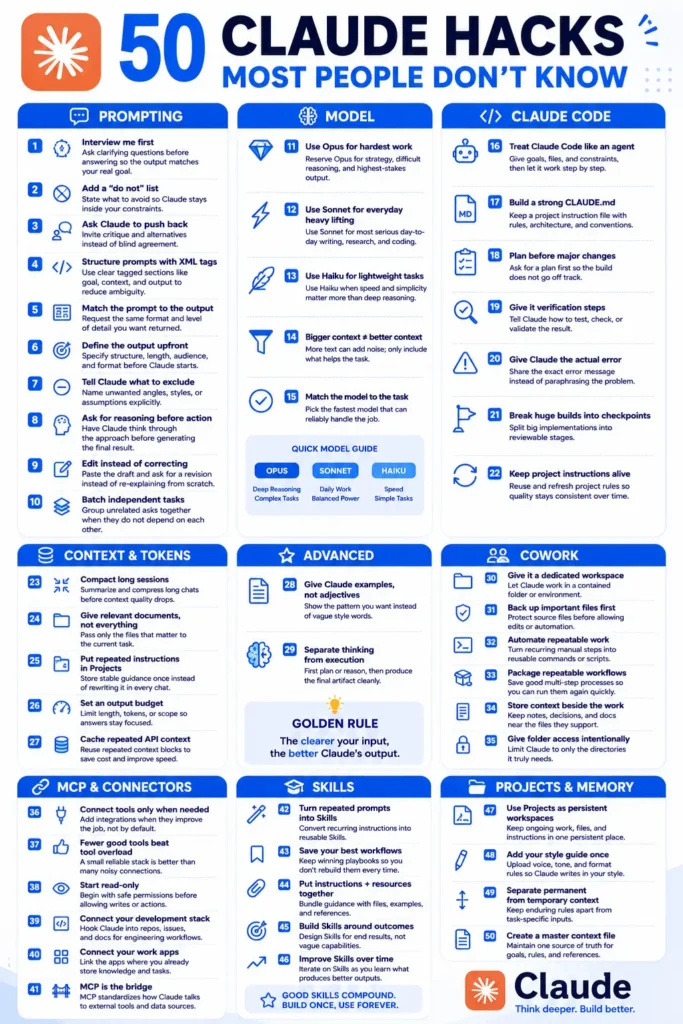
Most of the distance between a generic Claude answer and a genuinely useful one comes down to a few habits: choosing the right model for the task, front loading the context instead of drip feeding it, and keeping related work inside a Project rather than scattered across chats.
Fifty of those habits follow, covering prompting, model selection, context management, Claude Code, Skills, Projects and integrations.
The difference often isn’t the AI model. It’s how you work with it.
These 50 Claude Hacks are designed to help you get better results from Claude by improving your prompts, model selection, context management, Claude Code workflows, integrations, Skills, Projects, and memory.
Whether you’re a beginner, developer, marketer, researcher, creator, or business owner, you can apply these techniques to make Claude more useful and consistent.
The Claude Code walkthrough puts the coding hacks in working order, and the beginner guide covers anything assumed here.
What Are Claude Hacks?
Claude Hacks are practical techniques, prompting strategies, workflow improvements, and configuration ideas that can help you get more useful results from Claude.
Some are simple prompt improvements. Others involve Claude Code, Projects, Skills, connected tools, context management, and repeatable workflows.



The goal isn’t to make every interaction complicated.
In many cases, the best Claude Hacks actually make your workflow simpler by helping you:
- Give Claude better instructions
- Reduce unnecessary context
- Reuse successful workflows
- Improve consistency
- Choose an appropriate model for the task
- Organize project knowledge
- Verify generated work
- Automate repetitive processes
- Build reusable Skills and instructions
Let’s break down all 50.
A number of these apply specifically to Claude Code. If that is the part you care about, the full build walkthrough puts them in working order.
1. Interview Me First
Instead of immediately asking Claude to complete a task, ask it to interview you first.
This is useful when your goal is unclear or has multiple requirements.
Try:
Before completing the task, ask me the most important questions you need answered. Wait for my responses before creating the final result.
This can help Claude understand your actual objective before generating the answer.
2. Add a “Do Not” List
Tell Claude what it should avoid.
For example:
- Don’t use corporate language
- Don’t invent statistics
- Don’t repeat the same idea
- Don’t use unnecessary headings
- Don’t make unsupported claims
Negative constraints can be especially useful when certain mistakes repeatedly appear in generated output.
3. Ask Claude to Push Back
Don’t always ask Claude to agree with your idea.
Ask it to challenge your assumptions.
For example:
Critique this strategy. Identify weaknesses, risks, alternative approaches, and assumptions I may be missing.
This turns Claude into a thinking partner rather than a simple content generator.
4. Structure Prompts With XML Tags
For complex prompts, separate information into clear sections.
For example:
<goal>
Create a landing page.
</goal>

<context>
The product is designed for small businesses.
</context>

<constraints>
Use simple language and avoid exaggerated claims.
</constraints>

<output>
Return the final landing page copy.
</output>
Structured prompts can make complicated instructions easier to interpret.
Claude Hacks for Choosing the Right Model
Different tasks can require different levels of capability, speed, or cost. The model options available to you can also change over time, so always check what is currently available in your Claude environment.
1. Use Opus for Hardest Work
Use Opus when the task requires deeper reasoning, difficult strategy, complex analysis, or high-quality output where additional capability is valuable.
Don’t automatically use the most capable model for every simple task.
2. Use Sonnet for Everyday Heavy Lifting
Sonnet is a practical choice for many serious everyday tasks such as writing, research, analysis, and coding.
The idea is to balance capability with efficiency.
3. Use Haiku for Lightweight Tasks
For straightforward tasks where speed and simplicity matter more than deep reasoning, a lighter model can be appropriate.
Examples include:
- Simple classification
- Short summaries
- Basic transformations
- Quick brainstorming
- Simple text processing
Claude Code Hacks
Claude Code can be treated as an agent working through a development task rather than simply a chatbot answering isolated programming questions.
4. Treat Claude Code Like an Agent
Give Claude Code:
- A clear goal
- Relevant files
- Project constraints
- Expected behavior
- Verification requirements
Then let it work through the task step by step.
5. Build a Strong CLAUDE.md
Keep important project instructions in a CLAUDE.md file.
Useful information can include:
- Architecture
- Coding conventions
- Commands
- Testing instructions
- Project rules
- Important directories
- Development practices
This reduces the need to repeat the same project information.
6. Plan Before Major Changes
Before asking Claude Code to make a large modification, ask for a plan.
For example:
Analyze the existing implementation and propose a step-by-step plan before changing any files.
Reviewing the approach first can prevent unnecessary changes.
Context and Token Hacks
7. Compact Long Sessions
Long conversations can accumulate unnecessary information.
When a session becomes difficult to manage, summarize the important decisions, requirements, and current state before continuing.
8. Give Relevant Documents, Not Everything
If Claude only needs three files, don’t automatically provide thirty.
Relevant context is generally more useful than maximum context.
9. Put Repeated Instructions in Projects
If you repeatedly provide the same background information, move stable instructions into a Project or another persistent workspace where appropriate.
This saves time and helps maintain consistency.
Advanced Claude Hacks
10. Give Claude Examples, Not Adjectives
Instead of saying:
Make it professional.
Give Claude an example of what professional means to you.
Examples communicate patterns more clearly than vague descriptive words.
11. Separate Thinking From Execution
For complex work, divide the process into stages.
First ask Claude to understand or plan the task.
Then ask it to produce the final artifact.
This separation can make complex workflows easier to review and control.
Claude Cowork Hacks
12. Give It a Dedicated Workspace
When working with files or larger projects, use a contained workspace where the relevant material is organized.
A focused environment makes it easier to understand what belongs to the task.
13. Back Up Important Files First
Before allowing automated changes to important files, create a backup or use version control.
This gives you a recovery path if something goes wrong.
14. Automate Repeatable Work
If you perform the same manual process repeatedly, consider turning it into a reusable command, script, or workflow.
The best automation candidates are predictable tasks with clear inputs and outputs.
MCP and Connector Hacks
15. Connect Tools Only When Needed
Integrations are useful when they solve a real problem.
Don’t connect tools simply because they’re available.
Start with the tools that directly improve your workflow.
16. Fewer Good Tools Beat Tool Overload
A small collection of reliable integrations can be easier to manage than a large collection of overlapping tools.
Choose tools based on actual workflow requirements.
17. Start Read-Only
When introducing a new integration, begin with permissions that allow Claude to inspect information without making changes whenever possible.
Then expand permissions only when the workflow requires actions.
Claude Skills Hacks
18. Turn Repeated Prompts Into Skills
If you repeatedly give Claude the same instructions, consider turning the workflow into a reusable Skill where your setup supports it.
This can reduce repetitive prompting.
19. Save Your Best Workflows
When you find a workflow that consistently produces useful results, save it.
A successful workflow is an asset you can reuse.
20. Put Instructions and Resources Together
A useful Skill can combine instructions with relevant resources, examples, and reference material.
This gives Claude both the rules and supporting information it needs.
21. Build Skills Around Outcomes
Don’t create a Skill simply because a capability sounds interesting.
Build it around a specific outcome.
For example:
Convert a product brief into a structured SEO content brief.
Claude Projects and Memory Hacks
22. Use Projects as Persistent Workspaces
Projects are useful for ongoing work where the same files, instructions, and context are needed repeatedly.
Instead of rebuilding the same environment for every conversation, keep related work together.
23. Add Your Style Guide Once
If you want Claude to consistently write in your voice, provide a style guide containing things such as:
- Preferred tone
- Sentence style
- Formatting rules
- Words to avoid
- Brand terminology
- Examples of good writing
This is much more efficient than explaining your writing preferences every time.
24. Separate Permanent From Temporary Context
Not every instruction belongs in permanent project context.
Separate:
Permanent context
- Brand rules
- Writing style
- Architecture
- Long-term goals
- Core terminology
Temporary context
- Current campaign
- Today’s draft
- Temporary deadline
- One-time research
- Short-term experiment
This keeps persistent context clean.
25. Create a Master Context File
Create one source of truth containing the most important information Claude needs to understand your project.
A master context file might include:
- Project overview
- Goals
- Audience
- Brand guidelines
- Technical architecture
- Rules
- Important references
- Current priorities
Sabir’s take
Most of these came out of the same frustration: getting a competent answer when I wanted a specific one. The two that changed my week were asking Claude to interview me before it drafts anything, and writing an explicit do-not list. Both feel like extra work for about a minute, then save considerably more. I would leave the model-switching advice alone until the prompting habits are automatic.
Frequently Asked Questions About Claude Hacks
What are the best Claude Hacks for beginners?
Start with defining your output, adding a clear do-not list, providing examples, asking clarifying questions, and giving Claude relevant context. These techniques don’t require advanced configuration.
Can Claude Hacks improve coding workflows?
Yes. Techniques such as maintaining a strong CLAUDE.md, planning before major changes, providing exact error messages, breaking projects into checkpoints, and defining verification steps can make AI-assisted development more structured.