






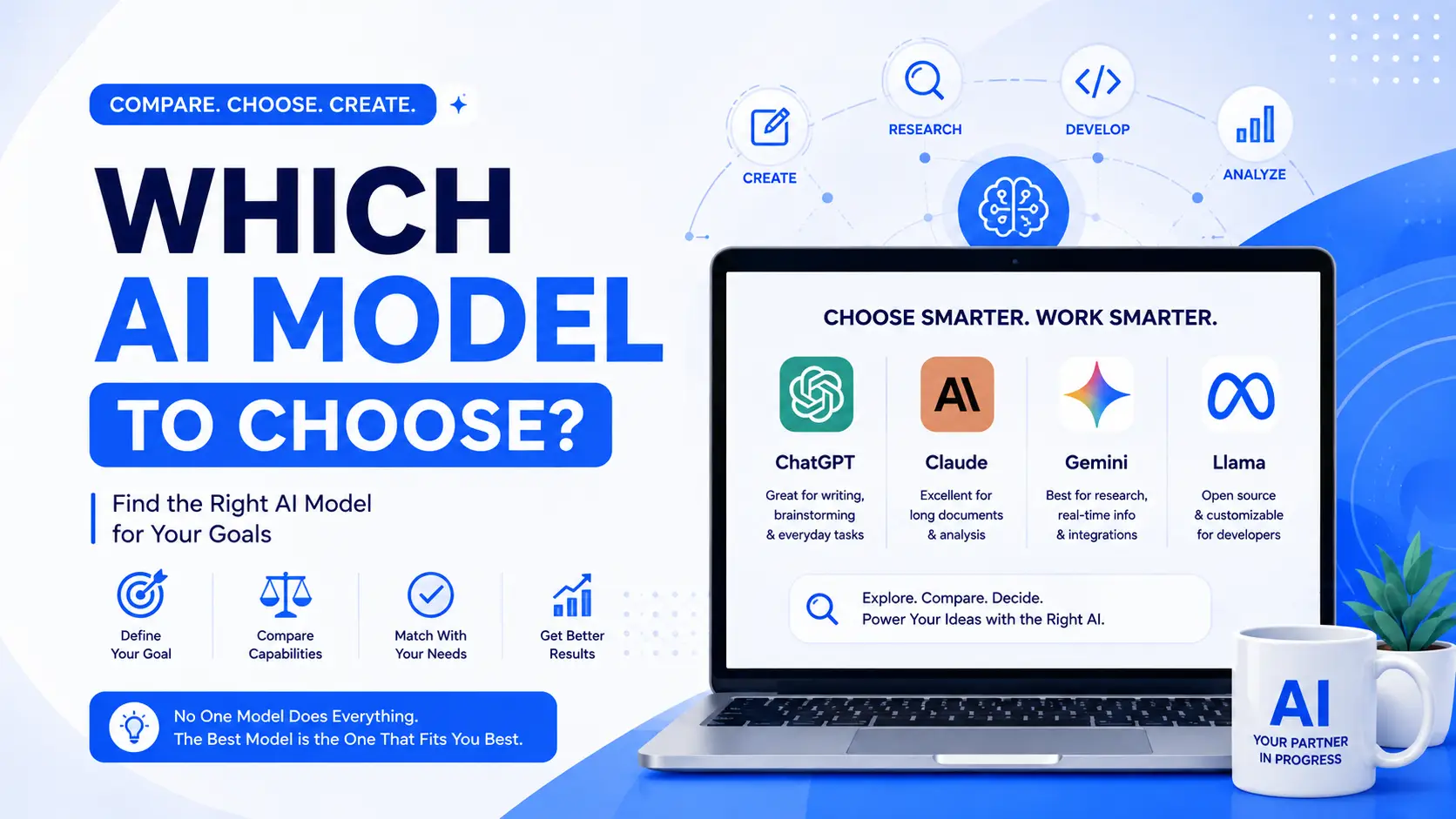
There is no best AI model, only a best fit for the thing in front of you. A model that writes well may be poor at current information. One that codes well may be wasteful for bulk text. The cheapest option is frequently enough for the job you actually have.
This guide compares six common options across writing, research, image generation, multilingual work, productivity, coding, privacy and running cost.
With so many AI models available, choosing the right one can quickly become confusing. The best AI model isn’t necessarily the one with the longest feature list or the highest price. It depends on what you actually need to accomplish.
This guide answers the question “Which AI Model to Choose?” by comparing six popular AI options across writing, research, image generation, multilingual work, productivity, coding, privacy, and cost.
The goal is simple: help you stop paying for the wrong AI tools and choose the model that fits your workflow.
1. Grok: Which AI Model to Choose for Real-Time Information?
Best for: searching what is happening right now.
Grok is particularly useful when your workflow depends on current conversations, trending topics, public sentiment, or information circulating on X.
Its major advantage is its connection to the X ecosystem, making it useful for understanding what people are discussing in real time.

Key Features of Grok
- Direct access to X data and conversations
- Useful for tracking current discussions
- Helpful for identifying trends and viral topics
- Can provide conversational responses
- Useful for monitoring sentiment around brands, products, and events
What Should You Use Grok For?
Grok can be a strong choice when you need to:
- Search for what’s happening right now
- Track trending subjects
- Monitor influencers or competitors
- Analyze public sentiment
- Summarize conversations happening on X
- Research emerging topics
Model: Grok 4.5
If your biggest priority is current conversations and social trends, Grok is one of the strongest choices in this comparison.
2. Claude: Which AI Model to Choose for Writing and Reasoning?
Best for: serious writing, analysis and long-form work.
Claude is particularly attractive for people who spend a large part of their day working with text, documents, research, coding, or structured information.
Its strengths include long-context work, reasoning, document analysis, and producing structured outputs.
Key Features of Claude
- Strong reasoning capabilities
- Large context window for working with substantial documents
- Extended Thinking for difficult problems
- Can create files such as DOCX, XLSX, PPTX and PDF
- Claude Code supports advanced coding workflows
What Should You Use Claude For?
Claude is a strong option for:
- Writing newsletters
- Creating reports
- Drafting emails
- Developing long-form content
- Analyzing contracts
- Reviewing PDFs
- Working with financial documents
- Creating spreadsheets
- Building presentations
- Complex reasoning tasks
- Coding and software development
Model: Claude Opus 4.5
If your work revolves around writing, documents, analysis and reasoning, Claude should be near the top of your shortlist when deciding which AI model to choose.
3. ChatGPT: Which AI Model to Choose for Image Generation?
Best for: image creation and creative workflows.
ChatGPT is a particularly versatile option when you want text and visual creation within the same workflow.
Its image capabilities make it useful for marketers, designers, creators, entrepreneurs, and businesses that regularly need visual assets.
Key Features of ChatGPT
- Native AI image generation
- Strong handling of complex visual prompts
- Image editing through conversational instructions
- Useful for combining text and visual workflows
- Large ecosystem of tutorials, examples and use cases
What Should You Use ChatGPT For?
ChatGPT can be useful for:
- Marketing visuals
- Blog graphics
- Social media assets
- Thumbnails
- Product mockups
- Concept art
- Infographics
- Branded illustrations
- Image editing
- Creative brainstorming
Model: ChatGPT (GPT-5.6)
If your priority is creating and editing visual content while working conversationally with AI, ChatGPT is a strong choice.
4. Gemini: Which AI Model to Choose for Multilingual Work?
Best for: multilingual content and Google-connected workflows.
Gemini stands out when language support, translation, localization, and integration with Google’s ecosystem are important to your workflow.
For people working across multiple languages, the ability to handle different scripts and linguistic contexts can be especially valuable.
Key Features of Gemini
- Strong multilingual capabilities
- Support for numerous languages and writing systems
- Useful for translation and localization
- Can work with video-related content
- Integration with Google services and Workspace
What Should You Use Gemini For?
Gemini is useful for:
- Translating content
- Localizing marketing campaigns
- Writing multilingual emails
- Working with non-English content
- Cross-language research
- Summarizing video content
- Multilingual customer support
- Google Workspace workflows
Model: Gemini 3.1 Pro
If your business operates across languages or already relies heavily on Google Workspace, Gemini can be a practical answer to the question “Which AI model to choose?”
5. Copilot: Which AI Model to Choose for Microsoft 365?
Best for: organizations deeply invested in Microsoft 365.
Copilot makes the most sense when your work already happens inside Microsoft’s productivity ecosystem.
Rather than switching between separate applications, Microsoft users can work with AI alongside tools they already use.
What Should You Use Copilot For?
Copilot can be useful for:
- Microsoft Word workflows
- Excel assistance
- PowerPoint presentations
- Outlook productivity
- Enterprise Microsoft environments
- Microsoft 365-based workflows
Should Everyone Choose Copilot?
Not necessarily.
If you’re already heavily invested in Microsoft 365, Copilot can make sense because of its integration with those applications.
However, if you want a broader standalone AI assistant for creative work, image generation, general-purpose research, or diverse AI workflows, other options may provide a better fit.
Model: Microsoft Copilot
The important lesson is that Copilot’s value depends heavily on your existing Microsoft environment.
Which AI Model to Choose? Quick Comparison
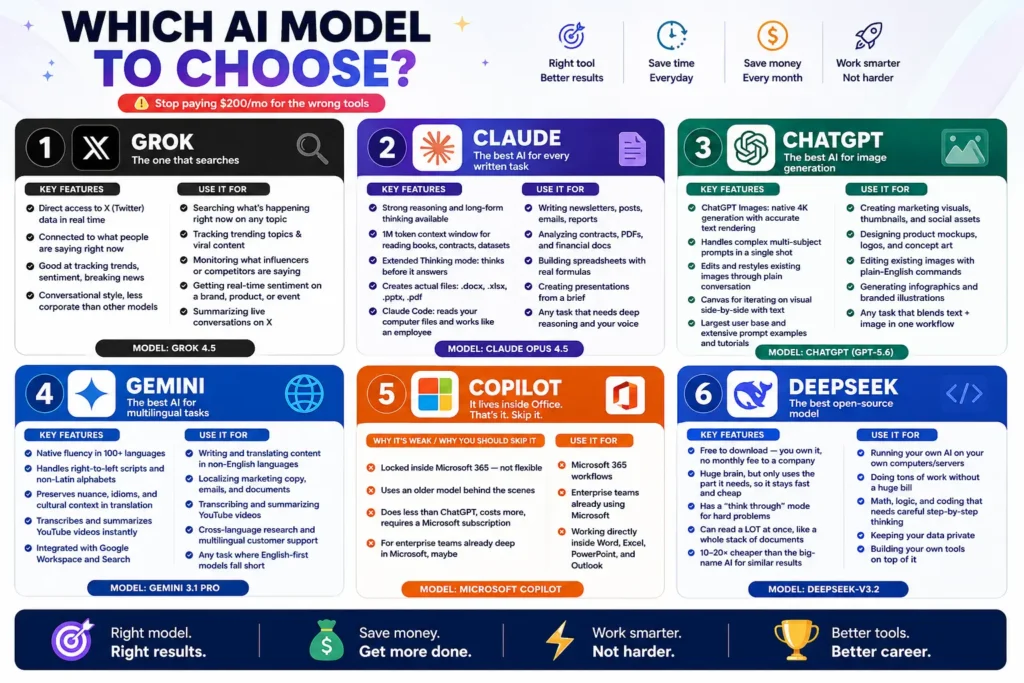
The easiest way to make a decision is to match the model with your primary task.
| Your Main Goal | Recommended AI |
|---|---|
| Real-time trends and X conversations | Grok |
| Writing and long-form content | Claude |
| Image generation and creative assets | ChatGPT |
| Translation and multilingual work | Gemini |
| Microsoft 365 productivity | Copilot |
| Self-hosting and cost-efficient AI | DeepSeek |
| Coding and technical work | Claude or DeepSeek |
| Social trend monitoring | Grok |
| Presentations and documents | Claude |
| Marketing visuals | ChatGPT |
| Google Workspace workflows | Gemini |
Which AI Model to Choose for Business?
Businesses should avoid choosing an AI model simply because it is popular.
Instead, consider five factors:
1. Your Primary Workflow
Determine where AI will actually be used.
Is it content creation, customer support, coding, research, design, sales, or internal productivity?
2. Your Existing Software
Your existing technology stack matters.
A Microsoft-heavy company may benefit from Copilot, while an organization using Google Workspace may find Gemini more convenient.
3. Your Budget
Don’t automatically assume the most expensive AI is the best option.
A specialized tool that solves your primary problem may provide more value than paying for several overlapping subscriptions.
4. Privacy and Deployment
Developers and businesses handling sensitive information should consider where their data is processed and whether self-hosting is important.
This makes models such as DeepSeek particularly interesting for certain technical use cases.
5. The Type of Output You Need
Different AI models are optimized for different workflows.
If you need documents, Claude may be attractive. If you need images, ChatGPT may be the better choice. If you need current social conversations, Grok may make more sense.
Sabir’s take
I keep two models open most days and switch by task rather than by loyalty. What I would push back on is the assumption that the newest or most expensive option is the sensible default. For a lot of routine work the cheaper models are indistinguishable, and the money is better spent on the tasks where reasoning quality genuinely shows.
Frequently Asked Questions About Which AI Model to Choose
Which AI model is best overall?
There isn’t one universally best AI model. The right choice depends on your workflow. Claude is strong for writing and reasoning, ChatGPT for visual and multimodal workflows, Grok for current social conversations, Gemini for multilingual work, Copilot for Microsoft 365, and DeepSeek for efficient and self-hosted AI applications.
Which AI is best for writing?
Claude is a strong choice for long-form writing, editing, reports, newsletters and document-heavy tasks. ChatGPT is also useful when writing needs to be combined with visual creation.
Which AI is best for image generation?
ChatGPT is the strongest choice in this comparison when image generation and conversational image editing are your primary requirements.
Which AI is best for real-time information?
Grok is particularly useful for tracking current conversations, trends and sentiment associated with X.
Final Verdict: Which AI Model to Choose?
So, which AI model to choose?
The answer depends on what you do most.
Choose Grok when real-time conversations, trends and X data matter most.
Choose Claude when writing, document analysis, reasoning and long-form work are your priorities.
Choose ChatGPT when image generation and creative multimodal workflows are important.
Choose Gemini when multilingual tasks and Google ecosystem integration matter.
Choose Copilot when your work revolves around Microsoft 365.
Choose DeepSeek when you want efficient AI, coding capabilities, or greater control through self-hosted deployments.
The smartest AI strategy isn’t necessarily subscribing to every major model. It’s identifying the tasks that matter most to you and choosing the tools that solve those tasks well.
If you’re still wondering which AI model to choose, start with your workflow, not the hype. The right model is the one that saves you time, improves your output, and fits naturally into the way you already work.
Explore more AI tools and resources on AIToolsay and find tools for different AI workflows through AIToolsay.
Thank you for reading. Follow AIToolsay on social media, enable push notifications, and subscribe to the newsletter to receive instant updates about new AI tools, models, guides, prompts, and practical AI resources.
Whichever you settle on, the habits that improve output transfer between models, and the tool roundup covers what sits on top of them. Pricing changes often, so check the vendor pages before committing.