








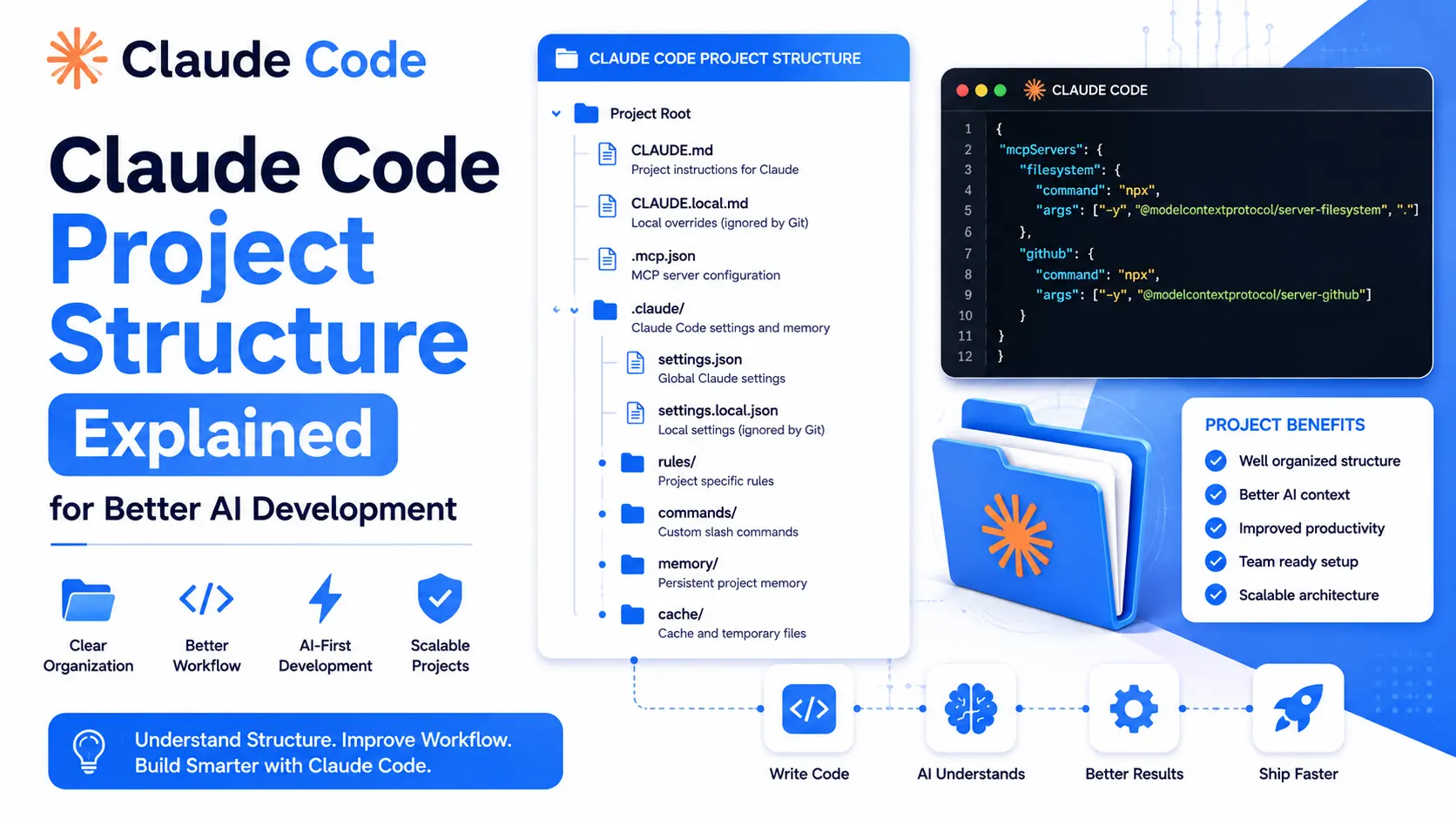
Claude Code reads your repository before it writes anything, so the layout decides how well it works. A file it cannot find is a rule it cannot follow.
This covers the files that matter, what each one is for, and the structure that keeps an agent inside the lines on a longer task.
What follows is the purpose of each file and directory, and how they combine. The layout matters most on a project big enough that Claude cannot hold all of it in context at once.
What Is Claude Code Project Structure?
The Claude Code Project Structure is a standardized directory organization that stores project instructions, AI configuration, reusable rules, custom commands, specialized agents, automation hooks, and MCP integrations.
Instead of placing all AI instructions into one large prompt, Claude Code separates different responsibilities into dedicated files and folders. This approach improves maintainability, keeps context lightweight, and allows projects to grow without becoming difficult to manage.
Some major advantages include:
- Better project organization
- Cleaner AI instructions
- Reusable coding standards
- Team collaboration
- Modular workflows
- Easier maintenance
- Faster onboarding for developers
Complete Claude Code Project Structure
Below is the recommended directory structure.
Project Root
│
├── CLAUDE.md
├── CLAUDE.local.md
├── .mcp.json
│
└── .claude/
    │
    ├── settings.json
    ├── settings.local.json
    │
    ├── rules/
    │   ├── code-style.md
    │   ├── testing.md
    │   └── api-conventions.md
    │
    ├── commands/
    │   ├── review.md
    │   └── fix-issue.md
    │
    ├── skills/
    │   └── deploy/
    │       ├── SKILL.md
    │       └── deploy-config.md
    │
    ├── agents/
    │   ├── code-reviewer.md
    │   └── security-auditor.md
    │
    └── hooks/
        └── validate-bash.sh
This Claude Code Project Structure separates responsibilities into logical modules, making AI-assisted development much easier.



What Each File in the Project Does
Each file below has one job. The structure only makes sense once you know which is which, so this runs through them in the order Claude Code reads them.
Claude Code Project Structure Overview
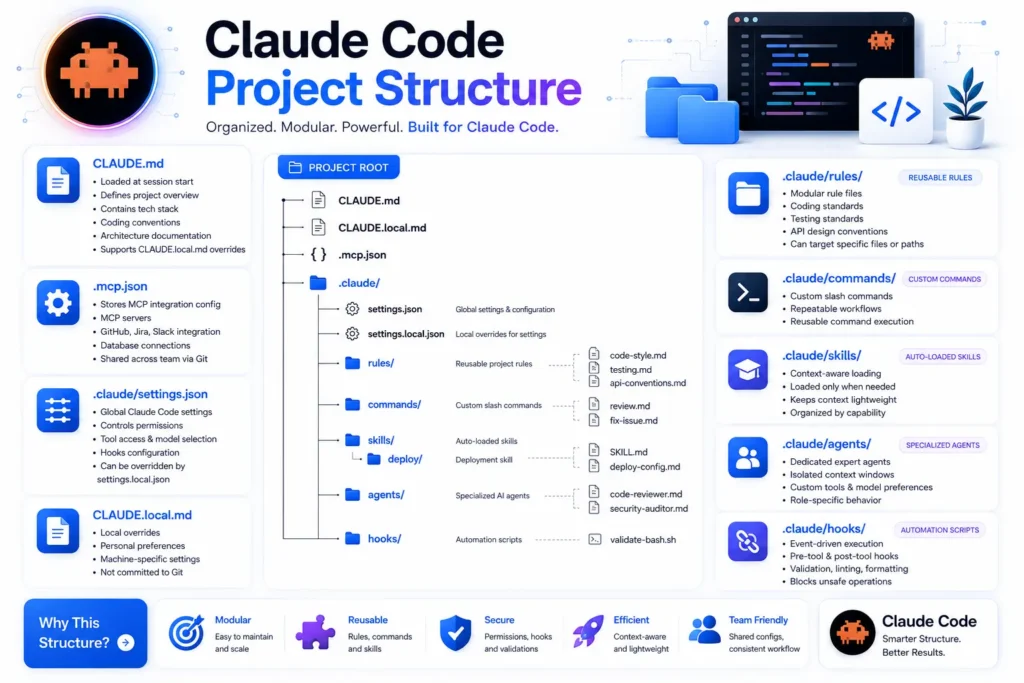
| File or Folder | Primary Purpose |
|---|---|
| CLAUDE.md | Main project instructions |
| CLAUDE.local.md | Local developer overrides |
| .mcp.json | MCP server integrations |
| settings.json | Global Claude settings |
| settings.local.json | Local settings overrides |
| rules | Reusable project standards |
| commands | Custom slash commands |
| skills | Context-aware reusable capabilities |
| agents | Specialized AI experts |
| hooks | Automation and validation scripts |
Understanding CLAUDE.md
CLAUDE.md is the heart of the Claude Code Project Structure.
It is automatically loaded whenever Claude Code starts a session.
Typically, it contains:
- Project overview
- Architecture documentation
- Technology stack
- Coding conventions
- Naming standards
- Repository guidelines
- Development workflow
Because it loads first, it establishes the shared understanding of your project before Claude begins generating code.
Typical contents include:
- Project goals
- Framework information
- Folder conventions
- Coding practices
- Documentation rules
One important feature is that it supports overrides from CLAUDE.local.md.
Understanding CLAUDE.local.md
This file contains personal overrides that should remain local to an individual developer.
Common examples include:
- Personal preferences
- Local environment settings
- Experimental instructions
- Temporary configurations
Unlike shared project documentation, these changes should generally not affect the rest of the development team.
Understanding .mcp.json
The .mcp.json file stores configuration for Model Context Protocol (MCP) integrations.
This file allows Claude Code to communicate with external systems during development.
Typical integrations include:
- GitHub
- Jira
- Slack
- Database connections
- Internal developer tools
Since the file is shared through Git, every team member can access the same integrations consistently.
Example responsibilities include:
- Configuring MCP servers
- Authentication settings
- Repository integrations
- Shared development workflows
Understanding .claude/settings.json
The settings.json file stores global Claude Code settings.
It controls how Claude behaves throughout the project.
Common configuration includes:
- Tool permissions
- Model selection
- Available capabilities
- Hook configuration
- Security restrictions
If needed, these settings can be overridden using settings.local.json.
Understanding settings.local.json
This file provides local overrides without changing the shared project configuration.
Examples include:
- Personal tool preferences
- Local testing options
- Machine-specific settings
- Temporary debugging configurations
Keeping these separate prevents unnecessary Git conflicts.
Understanding the Rules Directory
The rules folder stores reusable documentation that guides Claude across different parts of the project.
Example structure:
rules/
├── code-style.md
├── testing.md
└── api-conventions.md
Instead of writing one massive instruction document, developers can organize standards into focused files.
Common rule categories include:
- Coding style
- Testing guidelines
- API conventions
- Documentation rules
- Naming standards
- Architecture requirements
This modular approach improves maintainability and makes updating standards much easier.
Understanding the Commands Directory
The commands folder contains reusable slash commands.
Example:
commands/
├── review.md
└── fix-issue.md
These commands automate repetitive development tasks.
Typical use cases include:
- Code review
- Bug fixing
- Documentation generation
- Refactoring
- Performance analysis
- Security checks
Instead of rewriting the same prompt repeatedly, developers can trigger predefined workflows using custom commands.
Understanding the Skills Directory
Skills provide reusable capabilities that load only when necessary.
Example:
skills/
└── deploy/
    ├── SKILL.md
    └── deploy-config.md
The purpose of Skills includes:
- Context-aware loading
- Lightweight prompts
- Organized capabilities
- Reusable workflows
For example, deployment instructions don’t need to load during routine coding sessions. Claude only loads them when deployment-related tasks are requested, helping reduce unnecessary context usage.
Understanding the Agents Directory
The agents folder defines specialized AI experts.
Example:
agents/
├── code-reviewer.md
└── security-auditor.md
Each agent focuses on a particular responsibility.
Examples include:
- Code Reviewer
- Security Auditor
- Documentation Expert
- API Designer
- Testing Specialist
- Performance Optimizer
Each agent can maintain:
- Dedicated instructions
- Separate context
- Custom tools
- Role-specific behavior
- Preferred models
This specialization often leads to more focused and consistent results.
Understanding the Hooks Directory
Hooks automate actions before or after specific events.
Example:
hooks/
└── validate-bash.sh
Typical hook capabilities include:
- Validation
- Formatting
- Linting
- Security checks
- Unsafe command blocking
- Automated verification
Hooks help maintain code quality by ensuring important checks happen automatically during development.
Complete Directory Structure
.
├── CLAUDE.md
├── CLAUDE.local.md
├── .mcp.json
└── .claude
    ├── settings.json
    ├── settings.local.json
    ├── rules
    │   ├── code-style.md
    │   ├── testing.md
    │   └── api-conventions.md
    ├── commands
    │   ├── review.md
    │   └── fix-issue.md
    ├── skills
    │   └── deploy
    │       ├── SKILL.md
    │       └── deploy-config.md
    ├── agents
    │   ├── code-reviewer.md
    │   └── security-auditor.md
    └── hooks
        └── validate-bash.sh
Benefits of Using Claude Code Project Structure
Using the Claude Code Project Structure provides several advantages.
| Benefit | Description |
|---|---|
| Better Organization | Keeps instructions modular and easy to manage |
| Team Collaboration | Shared standards across developers |
| Faster Development | Reusable commands and skills reduce repetitive work |
| Improved Maintainability | Small focused files are easier to update |
| Better AI Responses | Structured context produces more accurate results |
| Reduced Context Size | Skills load only when required |
| Higher Code Quality | Rules and hooks enforce standards automatically |
Best Practices for Claude Code Project Structure
To get the most from the Claude Code Project Structure, consider these recommendations:
- Keep
CLAUDE.mdconcise and project-focused. - Store reusable standards inside the
rulesdirectory. - Separate local preferences into
CLAUDE.local.md. - Use custom commands for repetitive workflows.
- Create specialized agents instead of one large instruction file.
- Organize skills by capability.
- Enable validation hooks for formatting and linting.
- Version-control shared configuration files.
- Document integrations inside
.mcp.json. - Regularly review and update project documentation.
Following these practices makes projects easier to scale and collaborate on.
Common Mistakes to Avoid
Many developers new to Claude Code make avoidable mistakes.
Avoid these common issues:
- Placing every instruction inside one file
- Mixing local and shared configuration
- Creating duplicate rules
- Ignoring automation hooks
- Using inconsistent coding standards
- Forgetting documentation updates
- Keeping obsolete commands
- Overloading project context unnecessarily
A well-organized structure prevents these problems before they grow.
Sabir’s take
This layout is overhead on a small project and I would not impose it early. A single CLAUDE.md does almost everything the full tree does, until the codebase outgrows what Claude can hold in context at once. Add each piece when you notice its absence. Structure invented ahead of need tends to get ignored, including by me.
Frequently Asked Questions
What is Claude Code Project Structure?
Claude Code Project Structure is a standardized directory layout that organizes project instructions, settings, rules, commands, skills, agents, hooks, and MCP integrations for efficient AI-assisted software development.
What does CLAUDE.md do?
CLAUDE.md serves as the primary project instruction file. It defines the project overview, architecture, technology stack, coding conventions, and other essential documentation loaded at session start.
Why is .mcp.json important?
The .mcp.json file configures Model Context Protocol integrations, allowing Claude Code to connect with services such as GitHub, Jira, Slack, and databases through shared project settings.
What are Claude Code Skills?
Skills are modular capabilities that load only when required. They keep project context lightweight while providing reusable functionality for specialized workflows like deployment or testing.
What are Claude Code Agents?
Agents are specialized AI roles dedicated to tasks such as code reviews, security auditing, documentation, or performance optimization. They operate with role-specific instructions and behavior.
Why should developers use Hooks?
Hooks automate validation, formatting, linting, and security checks before or after development events, helping maintain consistent code quality.
Can teams customize the Claude Code Project Structure?
Yes. Teams can add new rules, commands, skills, agents, and hooks while keeping the overall structure organized and maintainable.
When the Structure Gets in the Way
This layout suits a project of real size. On something small it is overhead, and a single CLAUDE.md will do everything the full tree does.
Add the pieces when you feel the absence of them, not before. Structure invented ahead of need tends to get ignored.
The structure only earns its keep on a real build, which the full app walkthrough covers, and the wider Claude habits apply alongside it.